QR Codes And Hidden Links
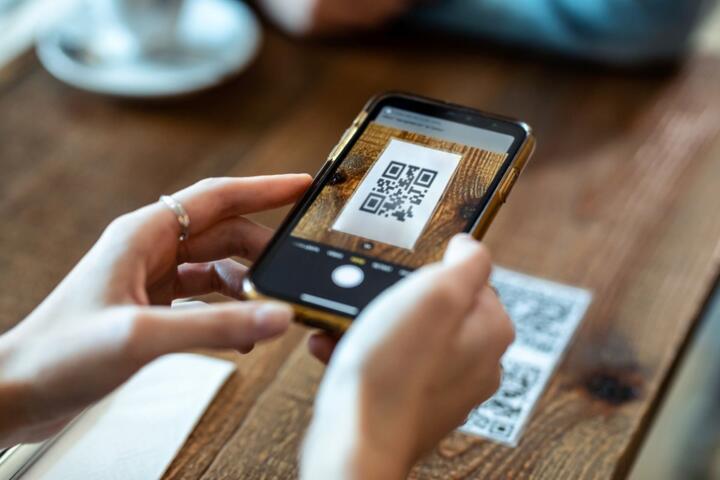
QR codes look like a harmless shortcut, but the code usually points to a URL or triggers an action like opening a web page, starting a download, or launching an in-app flow. A scammer’s goal is to get you to scan without friction, then land you on a page that steals credentials, pushes a payment, or installs malware through a fake “confirm” step.
In practice, the same QR scanning habit that saves time also reduces your chance to notice mismatches between the physical context and the digital destination. A code on a restaurant table, a parking sign, or a clinic notice can be replaced with a printed counterfeit that sends to a lookalike domain. The attack often relies on the fact that most scanners show only a preview, and many people tap through quickly—especially on mobile browsers.
What People Get Wrong
People often treat “QR code scanned” as a safety check, but scanning only decodes the pattern; it does not validate who created the code or where the link ultimately lands. Many malicious flows use redirects: the QR points to a benign-looking intermediate URL, then the page forwards you to the real phishing site after a few seconds or after you click a button.
Another failure pattern involves trust in branding. A QR destination can mimic a familiar login page, a payment confirmation screen, or a health portal message, while the domain name differs by one character or uses a different top-level domain. Even when the page looks correct, the browser’s address bar and the certificate details are the only reliable indicators, and those details are easy to miss when the screen is small.
QR scams also depend on supporting technologies: URL shorteners, ad networks, and redirect services can hide the final destination. Some codes embed deep links that open an app directly, which can bypass the usual “open in browser and check the address” habit. On iOS and Android, the operating system may hand off to an installed app based on the link, which can make the origin harder to verify—frankly, most people skip the verification step because it interrupts the flow.
Finally, people underestimate physical tampering. A QR code sticker can be placed over an existing code, or a sign can be swapped. If the printed surface is slightly misaligned or the code edges look uneven, that’s a clue, but it’s not a guarantee. Attackers can print high-quality replacements, so you still need a digital check after scanning.
How To Reduce QR Risk
Verify The Destination Before Tapping
After scanning, pause on the preview screen and check the full domain in the address bar before you proceed. On many phones, the preview shows only the host name partially, so you may need to tap “details” or open the link in a browser view that reveals the full URL. If the destination is a login or payment page, confirm the domain matches the organization you expect and that the page uses HTTPS with a valid certificate.
Use a simple habit: compare the domain to the one you would type manually. If you cannot confidently name the domain, do not enter credentials. I’ve seen QR links that start with a legitimate-looking path but redirect to a different host after the first click; the preview alone did not reveal the final landing page.
Prefer Official Channels For Sensitive Actions
For payments, account logins, and any request for personal data, use the organization’s official app or type the address yourself. Many QR codes are used for low-risk actions like opening a menu, but the same physical placement can host a high-risk link. If a clinic, pharmacy, or insurer asks for login through a QR code, treat that as a red flag and navigate from the official website or app instead.
Realistic outcome: typing the domain manually adds a few seconds, but it blocks an entire class of QR tampering attacks. That time cost is usually smaller than the time needed to recover from credential theft.
Use Browser And Phone Safety Features
Turn on safe browsing protections in your browser and operating system. On Android, Google Safe Browsing is integrated into Chrome; on iOS, Safari uses built-in phishing and malware protections. Keep your OS and browser updated; a patch released on 2024-09-xx for a browser security component can matter because QR scams often rely on web-based exploits rather than QR decoding flaws.
Also watch for downloads. If the QR flow triggers a file download or asks to install a profile or certificate, stop. A QR code that leads to “install to continue” is not a normal pattern for menus, tickets, or routine information pages.
Report And Preserve Evidence
If you scan a QR code and land on a suspicious page, close the tab and do not enter information. Take a screenshot of the URL preview and the address bar, then report the code to the site owner or platform that hosted it. If the QR code was on public signage, report it to the property manager or local authority responsible for the location.
If you entered credentials, change the password immediately from a trusted device and enable multi-factor authentication. If you entered payment details, contact your bank or card issuer promptly; many issuers can freeze transactions or flag the card for fraud review. The sooner you act, the more likely the attacker’s window closes.
Educational Case Examples
Clinic Notice With Redirect
A patient scans a QR code printed on a clinic door for “appointment check-in.” The phone opens a page that looks like the clinic’s scheduling portal, but the address bar shows a different domain after a short redirect. The patient closes the page before entering any login details and instead navigates to the clinic’s official website by typing the address from a card received earlier. The clinic later confirms the sticker was replaced after hours.
This scenario shows how redirects can defeat the “the first page looks right” habit. The patient’s decision to stop at the address bar check prevented credential entry.
Restaurant Menu With Payment Trap
A diner scans a QR code on a table to view a menu. The menu loads, but a “pay now” button sends to a checkout page that requests card details and claims the restaurant is “verifying your order.” The diner notices the domain does not match the restaurant’s known payment provider and closes the flow. The diner pays at the counter instead and reports the table’s QR code to staff.
This example highlights a common pattern: the QR code may deliver a believable menu, then switch to a fraudulent payment step after you click a secondary action.
QR Safety Checklist
| Situation | What To Check | Red Flags | Safer Next Step |
|---|---|---|---|
| Menu or brochure | Domain in address bar; HTTPS | Requests to install apps or enter login | Close and search the official site |
| Login or patient portal | Exact domain match; certificate validity | Domain mismatch after redirect | Type the official URL or use the app |
| Payment or ticketing | Payment provider name; address bar host | “Verify” prompts or unusual fees | Pay through known checkout methods |
| Downloads | File type and source host | Unexpected executables or profiles | Do not download; report the code |
Checklist habit: scan, read the full host name, then decide. If the flow asks for credentials or payment before you confirm the host, stop.
Common Mistakes To Avoid
One mistake is scanning and immediately entering information because the page “looks like” the right organization. Visual similarity does not prove legitimacy; attackers can copy layouts and logos. The address bar and certificate details are the only reliable indicators, and those details are often hidden behind a quick tap.
A second mistake is trusting the QR code’s physical placement. A code printed by a business can still be replaced by a third party, and a code placed on a public surface can be tampered with. If the code is loose, misaligned, or printed over another label, treat it as untrusted until you verify the destination.
A third mistake is ignoring redirects. Some QR links use a chain of redirects that changes the host after you click. If you see the URL change, or the page title changes without a clear reason, exit the flow and verify the destination from a trusted source.
A fourth mistake is assuming that “safe browsing” always catches the scam. Browser protections reduce risk, but they do not block every phishing page, especially when attackers use fresh domains or short-lived hosting. I’ve noticed that even when a page loads, the browser may not warn until after you interact with a form, which is too late for credential entry.
FAQ
Can A QR Code Steal Passwords Without A Download?
Yes. Many QR scams lead to a phishing website that collects credentials through a form. The attacker does not need a file download if the goal is account takeover.
How Can I See The Full Link On My Phone?
Use the scanner’s preview screen and tap for details, or open the link in a browser view that shows the full address bar. Some scanners show only a shortened host until you expand the preview.
Do QR Codes Always Use URLs?
Most consumer QR codes embed URLs, but QR can also encode other data types. Scams still commonly use URLs because they can redirect to phishing or payment pages.
What Should I Do If I Already Scanned A Suspicious QR?
Close the page, avoid entering any information, and check whether you granted permissions. If you entered credentials or payment details, change passwords and contact your bank or card issuer promptly.
Are QR Scams Covered By Consumer Protection Laws?
Some protections apply through card chargeback rules, bank fraud policies, and consumer reporting processes, but coverage varies by country and payment method. Keep screenshots and timestamps so you can report accurately.
Author's Insight
QR scams work because QR scanning reduces friction, while web phishing relies on domain and redirect behavior that users rarely verify. The most reliable defense is not “trusting the code,” but checking the destination host and certificate details before entering credentials or payment information.
Evidence from security guidance consistently points to phishing and redirect chains as the core mechanism, not weaknesses in QR decoding. Phone and browser protections help, yet they cannot replace destination verification when a page loads and asks for input.
One practical habit is to treat any QR flow that requests login, card details, or app installation as untrusted until you confirm the exact domain from the address bar.
Key Takeaways
- Scanning decodes data; it does not validate the sender or the final destination.
- Check the full host name in the address bar and watch for redirects that change the domain.
- For logins and payments, navigate from official apps or type the known URL instead of relying on the QR.
- If you entered sensitive data, act quickly: change passwords and contact your bank or card issuer.